
Arqivis VPN
Accès à distance pour Arqivis
Télécharger le fichier
-
aarch64 (64 bits)
Arqivis_VPN_1_1_1_aarch64.eap
320807e5c8535bb56112f3a58ef7a6dd12fdc6b61f515de28d880dfb5d50b51b -
armv7hf (32 bits)
Arqivis_VPN_1_1_1_armv7hf.eap
1856745ae1f30f35493d36bb3df7478d12467eb59e7f713faa0e219ab2e93114
De quel fichier ai-je besoin ?
Les caméras Axis existent en deux types, aarch64 et armv7hf, et chacun a son propre fichier. Seul le fichier correspondant s'installe.
Lire l'information sur la caméra
Connectez-vous à la caméra, ouvrez la page « Apps » et cliquez sur « Add app ». La fenêtre affiche l'architecture de la caméra.
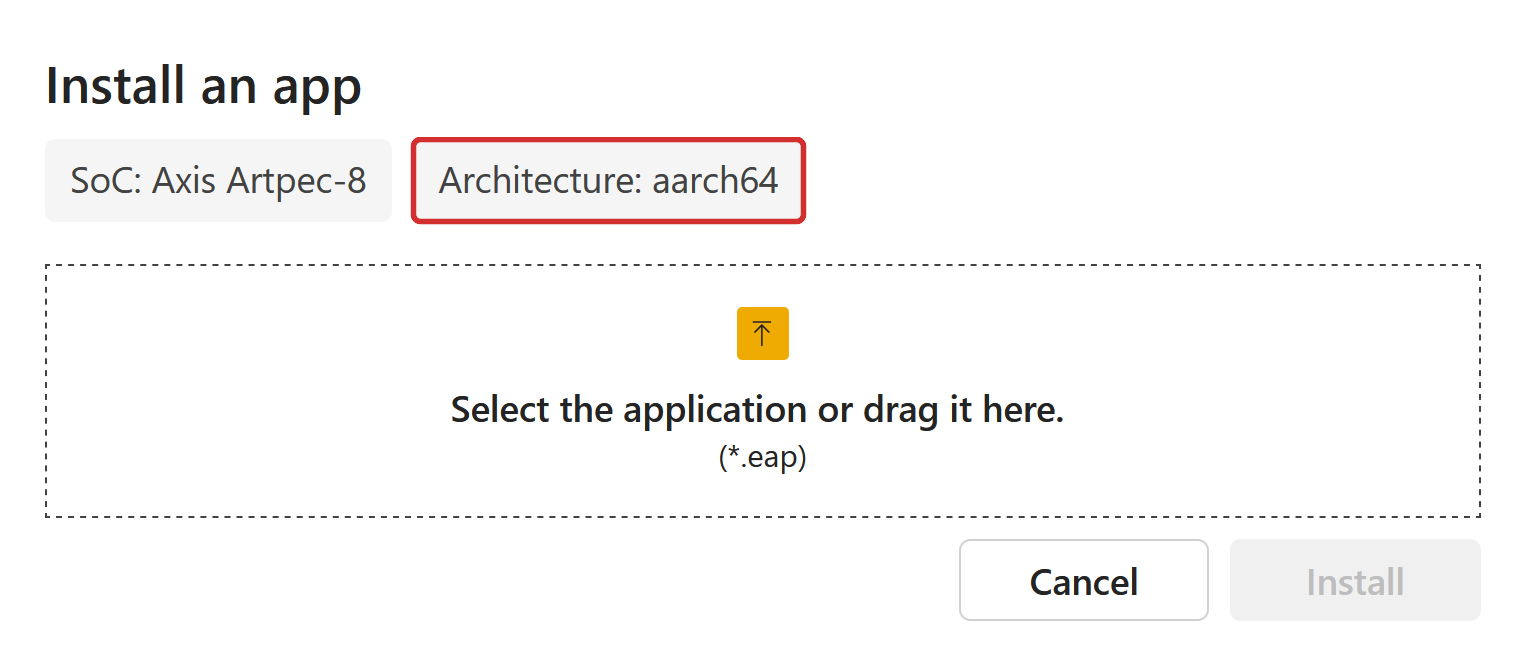
Vous n'êtes pas devant la caméra et vous avez un doute ? Téléchargez les deux fichiers. La caméra refuse le mauvais fichier avec un message d'erreur et rien n'est modifié.
Pour vérifier le téléchargement, comparez son empreinte SHA-256 avec celle indiquée ici. Sous Windows : certutil -hashfile FICHIER SHA256. Sous macOS ou Linux : shasum -a 256 FICHIER.
Installer l'application sur la caméra
- Dans votre navigateur, ouvrez http://ip-de-la-camera/ et connectez-vous comme administrateur.
- Ouvrez la page « Apps » (dans le menu de gauche).
- Cliquez sur « Add app », choisissez le fichier téléchargé, puis cliquez sur « Install ».
- Lorsque l'application apparaît dans la liste, activez-la.
- Cliquez sur l'application pour ouvrir sa page de réglages et suivez les instructions.
Si la caméra indique que l'application n'est pas compatible, vous avez pris l'autre type de fichier. Vérifiez ci-dessus de quel fichier votre caméra a besoin.
Besoin d'aide ? Contactez Arqivis via https://www.arqivis.com.
Toutes les versions
1.1.1 · Publiée le 2026-10-29
Changelog
- The bundled VPN client is updated to 0.81.5.
- The live app log view now follows the app's own daily log instead of the camera's system log, so it shows everything the app logged that day.
- A log tail cut at the 200 KB limit now starts on a whole line instead of a fragment.
- Stored log files are no longer labelled as archived, since the list also includes today's file.
Fichiers
-
aarch64 (64 bits)
Arqivis_VPN_1_1_1_aarch64.eap
320807e5c8535bb56112f3a58ef7a6dd12fdc6b61f515de28d880dfb5d50b51b -
armv7hf (32 bits)
Arqivis_VPN_1_1_1_armv7hf.eap
1856745ae1f30f35493d36bb3df7478d12467eb59e7f713faa0e219ab2e93114
1.1.0 · Publiée le 2026-09-18
Changelog
- The bundled VPN client is updated to 0.78.2.
- Lazy connections now follow the account setting on the management server instead of a per-device toggle.
- The watchdog no longer restarts the VPN service during a management outage while peers are still connected.
- Daily VPN service logs are now named vpn_YYYY-MM-DD.log.
- The setup key field shows the key in plain text, so a paste can be checked and browsers no longer offer to save it as a password.
Fichiers
-
aarch64 (64 bits)
Arqivis_VPN_1_1_0_aarch64.eap
c0708c4e43d29257a83dd73fa59f2ae81e88cfaf5d70121a53a539e612a66b62 -
armv7hf (32 bits)
Arqivis_VPN_1_1_0_armv7hf.eap
a818120910acc85c87e36a0157a5cc4ff6933e5ea3d545d05e7f7cec15a79c81
1.0.0 · Publiée le 2026-09-04
Changelog
- Initial release of the VPN ACAP for Axis cameras, managed from the camera's settings page.
- VPN lifecycle from the camera: enroll with a one-time setup key, connect, disconnect, reconnect, restart the service and deregister. Deregistering wipes the enrollment while keeping the app's settings and log archive.
- Lazy connections, on by default: peer tunnels come up on demand rather than all at once.
- Tunnel settings for the WireGuard listen port, MTU and interface name, plus an external IP map that advertises a router's public address to peers behind CGNAT or hard NAT.
- Live tunnel status, a detail view of the full daemon state, and a searchable, sortable table of peers with connection type, latency and transfer counters.
- A watchdog that restarts the VPN service when the management connection stays down or the daemon exits, with a configurable timeout.
- On-device logs with daily rotation and configurable retention, an in-browser viewer with a live tail, downloadable support bundles and a built-in iperf3 server for throughput testing.
- The settings API is reachable only through the camera's reverse proxy and requires administrator authentication; setup keys are never stored by the app or exposed on the command line.
Fichiers
-
aarch64 (64 bits)
Arqivis_VPN_1_0_0_aarch64.eap
3e721c05bf266897ab0a4bac6132d00cef148a6fefb5636ba8b8a73a0814bd2f -
armv7hf (32 bits)
Arqivis_VPN_1_0_0_armv7hf.eap
4fb9c8488ccc87a5410ab93f42131197c22a77eed133b6901574362c6d90834c